Cone VS Table — Damond’s Modpack
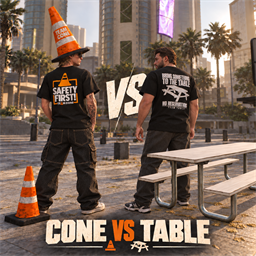
Pick your team and bring a new spot to your session! This pack combines custom Quick Drops, and wearable cosmetics.
Included:
- Picnic Table Quick Drop with worn surfaces, a weathered metal frame.
- Traffic Cone Quick Drop with weathered orange plastic.
- Cone Hat.
- Team Cone Shirt.
- Team Table Shirt.
Find the Quick Drops under the bkdamond category:
- bkdamond picnic table
- bkdamond traffic cone
Huge thanks to Noble (NOBLE1337) for all his help, sharing his ModKit, optimizing the table model, and guiding the process of getting Quick Drops into the game. This release wouldn’t have happened without his support!
Compatibility:
Uses these vanilla Quick Drop shells:
- own_bkrails_generic_icebergrailbox_00001
- own_bkprops_generic_cutout01_00001
Mods using the same shells will conflict.
Version: 1.0.0
Install Cone VS Table ModPack
You need ReSkate and your own copy of skate. on Steam.
- Open
ReSkateLauncher.exeand go to MODS. - Search for Cone VS Table ModPack and click install. The launcher also installs anything it depends on.
- Press PLAY. In game, the MODS tab of the ReSkate menu (Insert) turns it on and off.
Or install it by hand: download the .zip and drop it on the launcher window, or unzip it into its own folder in Mods\ beside Skate.exe.
Maps show up in the ReSkate menu's level list. To join a server running a custom map, you need the same map installed. If the game won't load after installing, see known issues.
skatemods doesn't host or review this mod. The download comes straight from Thunderstore. Only install mods you trust, because scripts can run code.