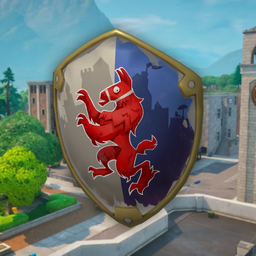
The Royale Shield back bling from Fortnite's Fort Knights set, brought to skate. through ReSkate: the red llama crest on a white and blue field, with a gold rim.
Install
Install with the Thunderstore Mod Manager (ReSkate community), then pick the shield in the character customizer.
Notes
- Worn on the upper back with the crest facing out, rigged to the spine so it moves with the skater.
- Same size and placement as the Black Knight shield back bling.
- Original Fortnite artwork with a matte, non-metallic finish.
- If the game updates, the mod may need a rebuild.
Credits
- Port to skate. / ReSkate: devinzzc
- Original 3D model: Royale Shield Back Bling, from Sketchfab.
- Fortnite and Royale Shield © Epic Games.
This is an unofficial, free fan tribute. It is not affiliated with or endorsed by Epic Games, Electronic Arts or Full Circle. If you are a rights holder and want it removed, contact the uploader.
Install Fortnite Royale Shield Backbling
You need ReSkate and your own copy of skate. on Steam.
- Open
ReSkateLauncher.exeand go to MODS. - Search for Fortnite Royale Shield Backbling and click install. The launcher also installs anything it depends on.
- Press PLAY. In game, the MODS tab of the ReSkate menu (Insert) turns it on and off.
Or install it by hand: download the .zip and drop it on the launcher window, or unzip it into its own folder in Mods\ beside Skate.exe.
Maps show up in the ReSkate menu's level list. To join a server running a custom map, you need the same map installed. If the game won't load after installing, see known issues.
skatemods doesn't host or review this mod. The download comes straight from Thunderstore. Only install mods you trust, because scripts can run code.