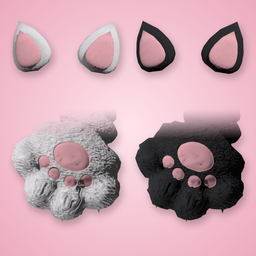
Fluffy cat paws and cat ears for your skater, in black and white.
What's included
| Item | Where to find it in game | Look |
|---|---|---|
| Cat Paws (Black / White) | Glasses | Fluffy paws with pink toe beans and a pink paw pad |
| Cat Ears (Black / White) | Hats | Cat ears with pink insides |
- Fits every body build.
- Your tops, bottoms and shoes stay on. Wear the paws and ears with any outfit.
- Mix and match: black paws with white ears, or the other way round.
Install
- Make sure ReSkate is installed and working.
- Download the mod and unzip it.
- Put the whole Paw_Paws folder into your
Skate\Modsfolder.
It should look likeSkate\Mods\Paw_Paws\with the mod files inside it. - Launch the game through ReSkate.
- Open your closet:
- Glasses → pick Cat Paws
- Hats → pick Cat Ears
Updating from an older version
Delete any older Paw Paws folder from Skate\Mods before adding this one.
Older versions used a full-body costume. If you had that equipped, unequip it (or change your outfit) before you remove the old version.
Troubleshooting
- The items don't show up: check that the folder is directly inside
Skate\Modsand not inside a second folder. - The game won't start after installing: remove any older Paw Paws versions, then try again.
Credits
Model and Textures Made by K7.
Install Paw Paws
You need ReSkate and your own copy of skate. on Steam.
- Open
ReSkateLauncher.exeand go to MODS. - Search for Paw Paws and click install. The launcher also installs anything it depends on.
- Press PLAY. In game, the MODS tab of the ReSkate menu (Insert) turns it on and off.
Or install it by hand: download the .zip and drop it on the launcher window, or unzip it into its own folder in Mods\ beside Skate.exe.
Maps show up in the ReSkate menu's level list. To join a server running a custom map, you need the same map installed. If the game won't load after installing, see known issues.
skatemods doesn't host or review this mod. The download comes straight from Thunderstore. Only install mods you trust, because scripts can run code.