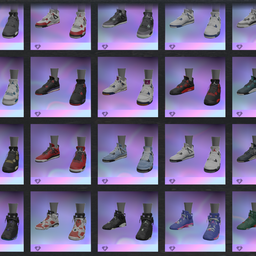
Expanded footwear pack for ReSkate featuring a large selection of Jordan-inspired shoe colorways and variants.
Update 1.1.0
- Added many new Jordan colorways
- Added Jordan 6 variants
- Expanded the overall footwear selection
- Updated package preview/icon
Installation
Thunderstore / ReSkate Mod Manager
Install or update this package normally through Thunderstore, then enable it before launching the game through ReSkate.
Manual install
- Close the game.
- Replace the contents of your existing
Jordan_Packmod folder with the contents of this ZIP. - Make sure
manifest.json,layout.toc, and theWin32folder are directly inside the mod folder. - Keep only one version of the pack installed.
- Launch the game through ReSkate.
Notes
This is version 1.1.0 of the same Jordan_Pack package, so upload it under the same Thunderstore team/package listing to publish it as an update.
Disclaimer
This is an unofficial, fan-made ReSkate mod package. All trademarks, shoe designs, and related branding belong to their respective owners.
Install Jordan Pack
You need ReSkate and your own copy of skate. on Steam.
- Open
ReSkateLauncher.exeand go to MODS. - Search for Jordan Pack and click install. The launcher also installs anything it depends on.
- Press PLAY. In game, the MODS tab of the ReSkate menu (Insert) turns it on and off.
Or install it by hand: download the .zip and drop it on the launcher window, or unzip it into its own folder in Mods\ beside Skate.exe.
Maps show up in the ReSkate menu's level list. To join a server running a custom map, you need the same map installed. If the game won't load after installing, see known issues.
skatemods doesn't host or review this mod. The download comes straight from Thunderstore. Only install mods you trust, because scripts can run code.