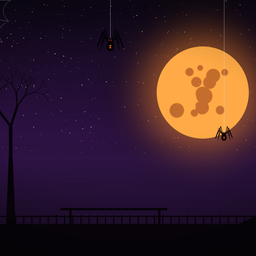
A spider-themed Halloween UI for skate., made with ReSkate Studio.
What's changed
- Loading screens: new artwork with a full moon, spider webs, black widows hanging over a skatepark silhouette and the KR logo
- Colors: blue accents become pumpkin orange, pink becomes purple and yellow becomes toxic green
- Score multiplier: the x1.5, x2, x3 and x4 icons are orange with a black outline and shadow
- Points meter and accents: the secondary accent colors are now orange, amber and purple
- Menus (including the clothes menu): neutral greys are replaced with a dark purple ramp
Requirements
- skate. on Steam (a supported ReSkate build)
- ReSkate installed
Install
- Open
ReSkateLauncher.exe, go to the MODS page and install from Thunderstore; or - Drag this zip onto the launcher window.
Notes
- Don't run this with another UI overhaul (for example Blue-Moon UI). Both change the same color lists and loading screens.
- The colors only apply with colorblind mode off.
- Built for the current game build. If skate. updates, the mod may need to be rebuilt.
Credits
- Artwork and design: Korrect
Install Korrects Halloween UI
You need ReSkate and your own copy of skate. on Steam.
- Open
ReSkateLauncher.exeand go to MODS. - Search for Korrects Halloween UI and click install. The launcher also installs anything it depends on.
- Press PLAY. In game, the MODS tab of the ReSkate menu (Insert) turns it on and off.
Or install it by hand: download the .zip and drop it on the launcher window, or unzip it into its own folder in Mods\ beside Skate.exe.
Maps show up in the ReSkate menu's level list. To join a server running a custom map, you need the same map installed. If the game won't load after installing, see known issues.
skatemods doesn't host or review this mod. The download comes straight from Thunderstore. Only install mods you trust, because scripts can run code.