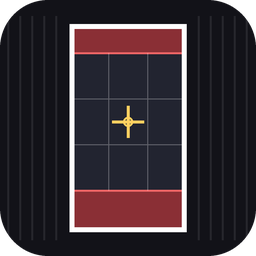
A framing overlay for the replay editor. Line up your shot so the clip fits a phone screen, a Story, a Reel or a feed post exactly, with nothing important hidden behind the app's own buttons.
What it does
- Draws a centred frame in the shape you pick and softly dims everything outside it, so you can still see the replay editor UI.
- Formats: Story 9:16, Reel / TikTok 9:16, Portrait 4:5, Square 1:1, Classic 4:3 and Wide 16:9.
- Safe zones: red bands show where the app's profile bar, caption and buttons cover the video (9:16 formats).
- Optional rule-of-thirds grid and centre cross for composing the shot.
- Shows the frame size in pixels each time you change something.
- Key legend on both sides of the frame lists every key and its options, with your current choice highlighted.
- Scales to any resolution and keeps the exact ratio.
It only draws a guide on your screen. It does not change the game or what gets recorded.
Install
- Download the zip and unzip it into your ReSkate
Modsfolder so you end up withMods\storyframe\. - ReSkate picks new plugins up automatically. If it does not show, restart the game.
Controls
| Key | Action |
|---|---|
| F4 | Show / hide the overlay |
| F2 | Cycle format |
| F3 | Cycle guides |
| F5 | Cycle dimming: Light, Medium, Dark, Off |
All keys can be rebound on ReSkate's Binds page.
Guides cycle in this order: frame only, then safe zones (default), then thirds grid, then centre cross.
How to use it
- Open the replay editor and press F4.
- Press F2 until you reach the format you are posting to.
- Move the camera so your skater sits inside the bright frame, in the clear area away from the red zones.
- Press F4 again to hide the overlay before you record.
Settings
Open plugin/main.lua in any text editor. The values at the top let you change:
START_FORMAT,START_DIM,START_GUIDES: what the mod starts on.SHOW_BADGE: turn the small ratio label in the frame corner on or off.SHOW_KEYS: turn the key legend on the sides of the frame on or off.FORMATS: the safe-zone percentages for each format, or add your own format.DIMS: how dark each dim level is.
The safe zones are estimates and apps change their layouts from time to time, so adjust them to taste.
Troubleshooting
- Nothing shows: check
logs/ReSkate.logfor lines starting with[storyframe]. - A key does nothing: another mod or the replay editor may be using it. Rebind it on the Binds page.
- Overlay too dark or too light: press F5 to change the dim level.
Credits
Made by Leigh.
Install StoryFrame
You need ReSkate and your own copy of skate. on Steam.
- Open
ReSkateLauncher.exeand go to MODS. - Search for StoryFrame and click install. The launcher also installs anything it depends on.
- Press PLAY. In game, the MODS tab of the ReSkate menu (Insert) turns it on and off.
Or install it by hand: download the .zip and drop it on the launcher window, or unzip it into its own folder in Mods\ beside Skate.exe.
Maps show up in the ReSkate menu's level list. To join a server running a custom map, you need the same map installed. If the game won't load after installing, see known issues.
skatemods doesn't host or review this mod. The download comes straight from Thunderstore. Only install mods you trust, because scripts can run code.