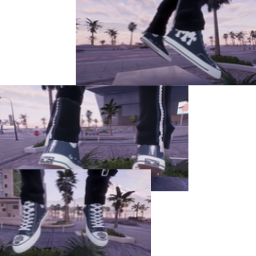
A custom shoe cosmetic mod for ReSkate featuring black canvas high-top Chuck Taylors customized with gothic Chrome Hearts style detailing.
Features
- Chrome Hearts Gothic Cross Patches: Leather cross patch overlays styled along the outer canvas quarters.
- Toe Cap Horseshoe Medallions: Detailed circular emblem prints stamped on the white rubber toe caps.
- Classic Chuck Details: Authentic All-Star ankle patches, script heel branding, and contrast stitching.
- Mod Manager Ready: Fully compatible with Thunderstore and standard ReSkate cosmetic loaders.
Installation
Automatic Installation (Recommended)
- Open your preferred ReSkate Mod Manager (e.g., Gale / Thunderstore Mod Manager).
- Search for
Pradash Chrome Hearts Chuck Taylor High-Tops. - Click Install.
Manual Installation
- Download and extract the
.ziparchive. - Drag and drop the extracted folder directly into your
ReSkate/Modsdirectory. - Open ReSkate, enable the mod in your Mod Manager, and equip the shoes in the character customization menu!
Mod Info
| Property | Value |
|---|---|
| Category | Shoes / Footwear |
| Author | Pradash |
| Target Game | ReSkate |
| Version | 1.0.0 |
Credits
Created by Pradash for the ReSkate community.
Install Pradash Chrome Hearts Chuck Taylor High Tops
You need ReSkate and your own copy of skate. on Steam.
- Open
ReSkateLauncher.exeand go to MODS. - Search for Pradash Chrome Hearts Chuck Taylor High Tops and click install. The launcher also installs anything it depends on.
- Press PLAY. In game, the MODS tab of the ReSkate menu (Insert) turns it on and off.
Or install it by hand: download the .zip and drop it on the launcher window, or unzip it into its own folder in Mods\ beside Skate.exe.
Maps show up in the ReSkate menu's level list. To join a server running a custom map, you need the same map installed. If the game won't load after installing, see known issues.
skatemods doesn't host or review this mod. The download comes straight from Thunderstore. Only install mods you trust, because scripts can run code.