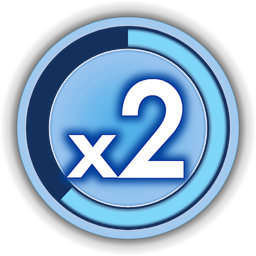
Brings the 2010 Skate 3 look to skate.'s bottom-left scoring HUD.
- Skate 3 multiplier badge: the see-through blue badge with its dark track ring, in place of skate.'s splatter-and-halftone multiplier: a blank badge before x1, then x1–x4 with a blue glow behind the number that grows with the multiplier. Crisp vector-drawn art at 2× skate.'s texture size (512 px for 4K, 256 px for 1080p).
- Works everywhere: on the default map, the other stock maps and custom maps.
- Blue combo ring: skate.'s line-timeout ring now sits inside the badge's track and is Skate 3 blue.
- Futura-like font: the trick names, score and line total use Jost, a free Futura lookalike.
Requirements
- ReSkate (built for the skate. build ReSkate currently supports; see
.reskate-studio-patch). - No other dependencies.
Install / uninstall
Install and enable it with your mod manager, or copy this folder into Mods\ and enable it in Mods\mods.json. Disable or delete it to uninstall.
Compatibility and known issues
- Font spillover: the HUD text styles are shared with a few other screens, which also switch to Jost: tutorial pop-up titles, the communication wheel, the quest panel, neighbourhood status and activity banners.
- Chinese/Korean characters: to fit Jost in without restructuring the game's font list, it replaces three CJK fallback fonts. Korean and Traditional Chinese characters in those styles (for example in player names) may not render. Other languages' UI is unaffected; only these HUD styles change.
- Unchanged text: the trick-metric boxes (e.g. "Step-Up 4.7 m") keep skate.'s font.
- Conflicts: other mods that change the scoring HUD (
scoringmultiplier_widget), the multiplier textures, or theskate-d85-cap,skate-h96-xbold-capsorskate-b52-semib-capstext styles will conflict. - Crash dumps, if any, go to
%LOCALAPPDATA%\ReSkate\Game\Skate\CrashDumps.
Credits
- Badge art: redrawn from scratch as vector art (designed in Claude Design) to match Skate 3's badge: rings, transparency and glow matched to Skate 3's original textures, glyphs set in Jost (digits) and League Spartan (the "x") and fitted to the original Skate 3 glyph shapes. No Skate 3 image data is shipped. Skate 3 and skate. are EA's.
- Fonts: Jost by indestructible type* (the in-game HUD font, stored internally under the replaced fonts' names) and League Spartan by The League of Moveable Type (badge glyphs, rendered into the badge images; no font file shipped). Both are SIL Open Font License 1.1; Jost's licence is in
OFL.txt. - Tools: built with ReSkate Studio's CLI (compile/deploy).
- AI disclosure: built with Claude Code (Anthropic, Claude Opus 5.5). It wrote the extraction, badge-generation and mod-building scripts and did the asset research. The badges were designed with Claude Design; no image-generation models were used.
Install Skate3 HUD
You need ReSkate and your own copy of skate. on Steam.
- Open
ReSkateLauncher.exeand go to MODS. - Search for Skate3 HUD and click install. The launcher also installs anything it depends on.
- Press PLAY. In game, the MODS tab of the ReSkate menu (Insert) turns it on and off.
Or install it by hand: download the .zip and drop it on the launcher window, or unzip it into its own folder in Mods\ beside Skate.exe.
Maps show up in the ReSkate menu's level list. To join a server running a custom map, you need the same map installed. If the game won't load after installing, see known issues.
skatemods doesn't host or review this mod. The download comes straight from Thunderstore. Only install mods you trust, because scripts can run code.