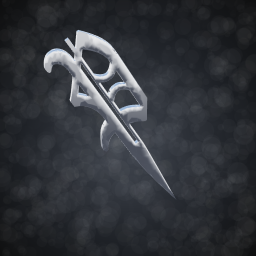
The whole board is one chrome blackletter P: mirror chrome, rounded rails and a dagger tail, sized like a big deck. No deck, trucks or wheels underneath, just the P.
Made by Prospect, a skate. content creator. Come hang out:
- TikTok: @iprospective
- Twitch: wprospect
How to use
- Install with the ReSkate launcher (MODS page) or a Thunderstore mod manager, then launch skate. through ReSkate.
- Open your board and go to Trucks, then pick Own_Prospect_P_Board_2.
Heads up
- This mod hides the standard deck and the default wheels for every board while it's enabled, the same way other board-shape mods do. Turn the mod off to get normal decks back.
- Other wheel cosmetics (not the default ones) will still show under the P.
- Only the look changes. The board still rides with a normal deck's physics.
- Like all ReSkate mods, it's tied to the current skate. build and may need an update after a game patch.
Requirements
- skate. (PC) with ReSkate 2.0.6 or newer.
Built with ReSkate Studio. This is a fan-made mod, not affiliated with EA or Full Circle.
Install Chrome P Board
You need ReSkate and your own copy of skate. on Steam.
- Open
ReSkateLauncher.exeand go to MODS. - Search for Chrome P Board and click install. The launcher also installs anything it depends on.
- Press PLAY. In game, the MODS tab of the ReSkate menu (Insert) turns it on and off.
Or install it by hand: download the .zip and drop it on the launcher window, or unzip it into its own folder in Mods\ beside Skate.exe.
Maps show up in the ReSkate menu's level list. To join a server running a custom map, you need the same map installed. If the game won't load after installing, see known issues.
skatemods doesn't host or review this mod. The download comes straight from Thunderstore. Only install mods you trust, because scripts can run code.