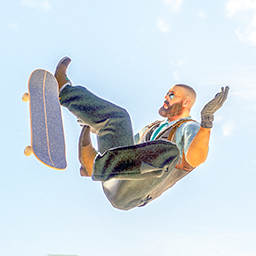
Little Kev Costume
Little Kev (The Professionals) as a full-body costume for skate., running on ReSkate.
Shows up in Apparel → Costumes as little kev.
Version 1.0.3
- Fixed crashing issue.
- Updated mesh
Version 1.0.1
- Attempted to fix crashing issue.
Version 1.0.0
- Full-detail CS2 model with source textures.
- Rigged to the skate. skeleton with custom weight transfers.
- UV maps and material slots split and mapped precisely to fit ReSkate Studio's container layout.
- Clean profile with the dufflebag mesh removed entirely for a streamlined suit look.
Install
1. Copy this folder into Skate\Mods.
2. Start the game through the ReSkate launcher and enable Little Kev Costume in the mod list if it isn't already.
3. In game, open Apparel → Costumes and equip little kev.
Built for ReSkate
Notes
- Personal use only. The model and textures were converted locally. Counter-Strike 2 and its content belong to Valve. This mod is not affiliated with or endorsed by Valve, Electronic Arts, Full Circle, or the ReSkate project.
- Built with ReSkate Studio (custom cosmetic from the crash test dummy costume template) and Blender.
Install CS2 Little Kev
You need ReSkate and your own copy of skate. on Steam.
- Open
ReSkateLauncher.exeand go to MODS. - Search for CS2 Little Kev and click install. The launcher also installs anything it depends on.
- Press PLAY. In game, the MODS tab of the ReSkate menu (Insert) turns it on and off.
Or install it by hand: download the .zip and drop it on the launcher window, or unzip it into its own folder in Mods\ beside Skate.exe.
Maps show up in the ReSkate menu's level list. To join a server running a custom map, you need the same map installed. If the game won't load after installing, see known issues.
skatemods doesn't host or review this mod. The download comes straight from Thunderstore. Only install mods you trust, because scripts can run code.