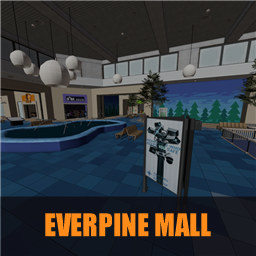
A big two-floor shopping mall to skate in ReSkate: fountains, shop fronts, stairs, balconies, ledges and rails. In game it is listed as gm_everpine_mall in the map list.
Ported from the Garry's Mod map gm_everpine_mall, from the Workshop addon Everpine Mall. The props, lights and grind rails along ledges and rails are kept; the doors and shutters were removed so every shop is open.
Credits and removal
The map and its textures belong to their original authors (the Workshop creator linked above, and Valve for the Half-Life 2 content it uses). This pack only converts it for skate. and claims none of it.
If you made this map, or own it, and do not want it here, contact me (BigT, on the ReSkate Discord) and I will remove it right away.
Si tu es l'auteur de cette map et que sa présence te gêne, contacte-moi (BigT sur le Discord ReSkate) et je la retire.
Install Everpine Mall
You need ReSkate and your own copy of skate. on Steam.
- Open
ReSkateLauncher.exeand go to MODS. - Search for Everpine Mall and click install. The launcher also installs anything it depends on.
- Press PLAY. In game, the MODS tab of the ReSkate menu (Insert) turns it on and off.
Or install it by hand: download the .zip and drop it on the launcher window, or unzip it into its own folder in Mods\ beside Skate.exe.
Maps show up in the ReSkate menu's level list. To join a server running a custom map, you need the same map installed. If the game won't load after installing, see known issues.
skatemods doesn't host or review this mod. The download comes straight from Thunderstore. Only install mods you trust, because scripts can run code.