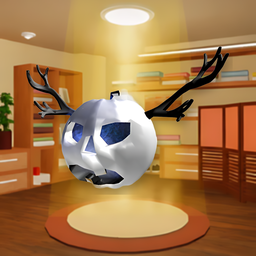
Ghosdeeri Mask — ReSkate Studio Source Package
Port by devinzzc
A fitted Ghosdeeri skull-and-antler mask mesh prepared for use with ReSkate Studio and the donor cosmetic shown in the provided in-game preview.
Important package status
This is a ReSkate Studio source package, not a compiled .fbmod and not a drop-in native mod. It contains the fitted GLB and its base-color texture so the cosmetic can be imported and rebuilt in ReSkate Studio. A native .fbmod is not included in this archive.
Contents
ReSkate_Source/Ghosdeeri_Mask.glb— fitted source mesh, based on the v6 alignment/scale adjustment.ReSkate_Source/Textures/Ghosdeeri_BaseColor.png— base-color texture extracted from the included GLB.ReSkate_Source/preview.png— in-game appearance reference.
Import / build in ReSkate Studio
- Open ReSkate Studio and go to Cosmetics.
- Select the donor cosmetic
Own_HeadwearMask_Gen_MaskSkull_00001(the skull-mask donor used for the fit). - Use the Mesh tab and import
ReSkate_Source/Ghosdeeri_Mask.glbas the custom mesh. - Check the head/neck alignment in the preview before creating the cosmetic. The current source reflects the smaller v4-sized fit with a small backward depth offset (v6); the final fit should still be checked on your installation.
- Keep the donor's four texture slots only: Base color, Base normal, Base mask, and Stitches. The GLB provides a base-color map; it does not provide four separately authored replacement maps.
- Name the new cosmetic, click Create New Cosmetic, save the Studio project, then use Export .fbmod.
- In the Studio Mods tab, add the exported
.fbmodand run Build & Deploy. Check selection and appearance in game.
Do not import this ZIP as if it were a native cosmetic package. The GLB is the source mesh for the Studio import step above.
Credit and attribution
- ReSkate port/fitting: devinzzc.
- Source reference: Roblox catalog item Ghosdeeri, asset ID
183468963. - The related Roblox Creator Store model listing Ghosdeeri, the Cursed Spirit credits DarkGenex. The original asset's redistribution license was not verified as part of this port; check the source's current terms/permissions before public redistribution.
- Unofficial fan-made cosmetic. Not affiliated with or endorsed by Roblox, EA, Full Circle, or the ReSkate project.
Modifications
The source mesh was uniformly scaled and repositioned for the donor headwear's in-game fit, then adjusted through several preview iterations. The package retains the source mesh's UV coordinates and embedded base-color texture. It does not include ReSkate Studio's native project or a compiled .fbmod.
Install Ghosdeeri Mask
You need ReSkate and your own copy of skate. on Steam.
- Open
ReSkateLauncher.exeand go to MODS. - Search for Ghosdeeri Mask and click install. The launcher also installs anything it depends on.
- Press PLAY. In game, the MODS tab of the ReSkate menu (Insert) turns it on and off.
Or install it by hand: download the .zip and drop it on the launcher window, or unzip it into its own folder in Mods\ beside Skate.exe.
Maps show up in the ReSkate menu's level list. To join a server running a custom map, you need the same map installed. If the game won't load after installing, see known issues.
skatemods doesn't host or review this mod. The download comes straight from Thunderstore. Only install mods you trust, because scripts can run code.